 Living Happy
In today’s digital world, managing multiple versions of code, documents, or any other type of digital asset is a ubiquitous challenge. The solution? Version control systems, the unsung heroes of seamless collaboration and version management. Version control, at its core, is a system that allows teams to track, manage, and save changes made to their work over time, mitigating the chaos and confusion that often accompanies collaborative projects.
Whether you’re a seasoned developer, a creative designer, or simply anyone juggling multiple versions of a document, understanding version control systems is critical to streamlining your workflow and safeguarding the integrity of your digital endeavors. This article aims to demystify the world of version control systems, unraveling their significance, benefits, and the key concepts that will equip you with the knowledge to master this essential tool for collaborative success.
What’s a Version Control System (VCS)?
A version control system is a tool that helps teams manage and track changes to code over time. It allows multiple developers to work on the same codebase simultaneously, ensuring that everyone is always working on the latest version of the code.
Version control systems also make it easy to roll back changes if something goes wrong. This can be a lifesaver if you accidentally delete a file or introduce a bug into the code.
There are many different version control systems available, each with its strengths and weaknesses. Some of the most popular VCSs include Git, Subversion, and Mercurial.
Benefits of Using a Version Control System
There are many benefits to using a version control system, including:
- Increased collaboration: VCSs make it easy for multiple developers to work on the same codebase simultaneously.
- Improved code quality: VCSs help to ensure that everyone is always working on the latest version of the code, which can help to improve code quality.
- Easier debugging: VCSs make it easy to track down the source of bugs, which can save time and frustration.
- Improved security: VCSs can help to protect your code from accidental deletion or modification.
How to Use a Version Control System
Getting started with a version control system is easy. Here are the basic steps:
- Choose a VCS: There are many different VCSs available, so you need to choose one that is right for you. Some of the most popular VCSs include Git, Subversion, and Mercurial.
- Install the VCS: Once you have chosen a VCS, you need to install it on your computer.
- Create a repository: A repository is a central location where your code is stored.
You need to create a repository for each project that you want to track.
- Add files to the repository: Once you have created a repository, you need to add files to it. You can add individual files or entire directories.
- Commit your changes: When you make changes to your code, you need to commit them to the repository.
This will save the changes and make them available to other developers.
Best Practices for Using a Version Control System
Here are some best practices for using a version control system:
- Use descriptive commit messages: When you commit changes to the repository, be sure to use descriptive commit messages. This will help other developers understand what changes you have made.
- Commit often: Don’t wait until you have made a lot of changes to commit them to the repository.
Commit often so that you can easily track your progress and roll back changes if necessary.
- Use branches: Branches allow you to work on different versions of the code simultaneously. This can be useful for working on new features or bug fixes without affecting the main branch.
- Merge your changes: Once you have made changes on a branch, you need to merge them back into the main branch.
This will make your changes available to other developers.
Conclusion
Version control systems are an essential tool for any development team. They help to ensure that code is always up-to-date, consistent, and well-managed. If you are not already using a VCS, I encourage you to start using one today.
You will be glad you did.
Types of Version Control Systems
There are two main types of version control systems: centralized and distributed.
Centralized version control systems store all of the code in a single central location. This makes it easy to manage and track changes, but it can also be a bottleneck if the central server is down or slow.
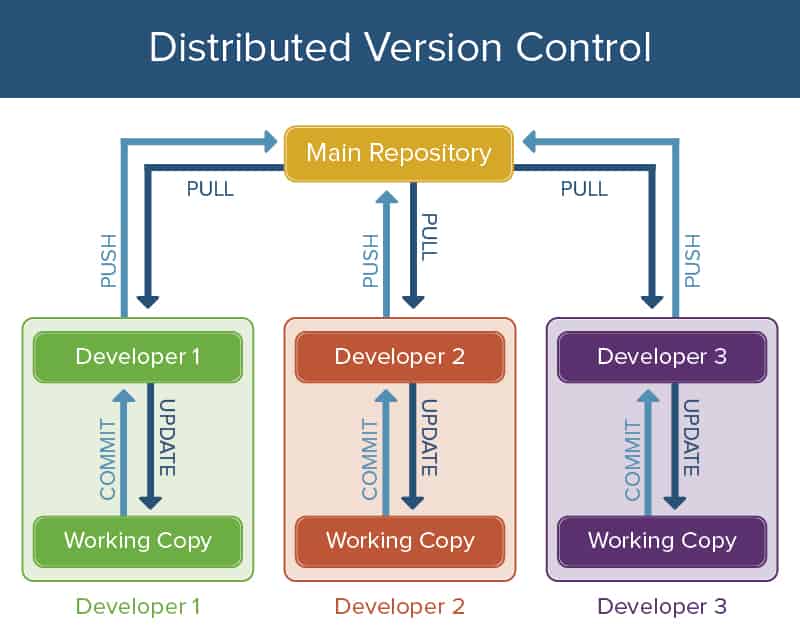
Distributed version control systems store the code on each developer’s computer. This makes it more difficult to manage and track changes, but it also means that the code is always available, even if the central server is down.
Choosing a Version Control System
When choosing a version control system, you need to consider the following factors:
- The size of your team: If you have a large team, you will need a VCS that can handle a large number of users and a large amount of code.
- The type of project you are working on: If you are working on a complex project, you will need a VCS that has features such as branching and merging.
- Your budget: There are both free and paid VCSs available.
Mercurial – A Fast, Scalable, Distributed VCS
Mercurial is a distributed version control system that is known for its speed and scalability.
Mercurial is also very easy to use. It has a simple command line interface and a number of graphical user interfaces (GUIs) available.
Mercurial is a good choice for teams that are working on large projects or that need a VCS that is fast and scalable.
Subversion – A Centralized VCS with a Rich Feature Set
Subversion is a centralized version control system that is known for its rich feature set.
Subversion has a powerful branching and merging system, and it also supports a variety of other features such as revision tagging, commit hooks, and access control.
Subversion is a good choice for teams that are working on complex projects or that need a VCS with a rich feature set.




